domingo, 20 de noviembre de 2011

PING

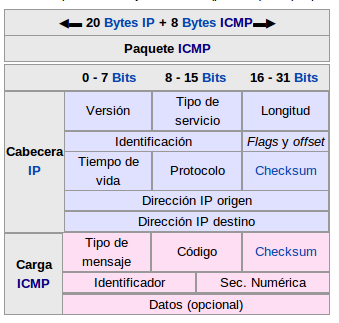
Ping (Pachet Internet Groper) tests the state of a host connection with one or more computers by sending ICMP (Internet Control Message Protocol) packets. For example, imagine that we have a ball and we throw it to someone in order to prove if he is awake, he returns the ball and we now know he is, if he doesn’t respond at this it means that he is not awake. This is how ping works. Ping works in network layer, it encapsulates the message into a packet and then sends it.

 
(In this image we show you how this packet is composed)

How does the ping work? In which port is it connected?. Ping works like ICMP, ICMP is part of the network layer (IP, routes, its objective is to make information to come from its origin to its destination), this layer is below the transport layer and works with routers. In the terminal, we can see ping by writing the command ping [ip adress], once that this is done, we can see constant messages of sent or lost packages.


Here we show you how a PING works
///request
Ping()
   ping.txt
validate()
   verify structure
execute()
   do ping->send

receive_ans(answer)
validate()
if  answer = true{
  echo “Connected”
}
else{
echo “Not Connected”
}

////anwer
receive_request()
validate(request)
if request = true{
 answer->send
}

References 
PING Image

Client-Server


A client server network is the one in which the clients are connected to a server. This server provides special services (such as web servers or FTP servers) to other machines or clients.
For example, when you are accessing a web page, the page is providing a server, while your machine, on the other hand, is providing no services, therefore it’s a client.
A machine may be both a server and a client. It can perform different tasks as a client and as a server. For example, a server can also have software running on it that allows it to act as a web server, an e-mail server and a FTP server.
The one that receives is know as a server, and the one that sends a demand is the client.

In a chat we can also clients connected to a server.
A server can listen for incoming calls or messages from all the connected clients and broadcast them. When the client know the IP adress of the server it can connect to the server in any PC.
The client can send messages to a server, and to the connected clients. It also views all the messages.

Sockets allow the implementation of a client-server model. Communication must be started by one of the clients. The server waits for the client to start the communication.
A socket is a process or an existing thread in the client and server machine, it  allows the client and server to read and write information. 


lunes, 14 de noviembre de 2011

Networking


A network is a group of devices interconnected with each other in order to share information, files, and resources. In order to make these operations we must have an operating system controlling them.

In a distributed system, unlike a multiprocessor system, processors dont share either a memory nor a clock, they communicate through buses, telephone lines or some other communication networks. In this system processors can be also called host, site or nodes.

When a system has data to send to another system, the sending system segments the data and adds header bytes to each segment, the resulting packages of information are know as packets.

A protocol defines the format and the order of messages exchanges between two or more communicating entities, as well as the actions taken on the transmission and/or receipt of a message or other event.

Let´s suppose we have 3 processes in different systems: A, B and C in a network. They can be connected in different ways:

  • Fully connected network: They are all directly linked

  • Partially connected network: Only some of them are directly linked
  • Hierarchical Network: They are in the form of a tree
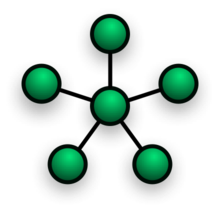
  • Star Network: One of the sites is connected to all of the other sites
  • Ring Network: Each one of the site is connected to exactly two other sites
  • Multiaccess bus network:They communicate directly with each other through a shared link
  • Hybrid Networks: Different networks connected together


References
Computer Networking (Kurose Ross)

lunes, 31 de octubre de 2011

Virtual Memory

The virtual memory is the separation between logical and physical memory. It makes life easier to programmers because they don´t have to worry about the physical memory available anymore.

In order to avoid external fragmentation, we can divide the information into smaller pieces called page frames, which contain the data of that page. Virtual adresses can be divided into two pieces: Page numbers and offsets within that page. 3


In order to access a piece of data at a given adress, a system first extracts both the page number and the offset. After extracting this data, the page number is translated to the physical frame id, then it accesses data at offset in the physical pageframe.


When there is not enough space to run a process, we can compact or relocate it. We can also swap to the disk a process that is not being used. Then, when it becomes available we can restore the process.
When we are looking for a process that is located in disk, a page fault occur. 


A translation lookaside buffer (TLB) is a cache memory administrated by the MMU. It contains slots of the page table, it also maps the relationship between virtual and physical adresses.
 
The page table keeps the track of where the virtual pages are loaded into the physical memory.
 
Page Replacement AlgorithmsIn the next table we have differents page replacement algorithms and this show the probles that have each one.


In the next image we have a simple psedocode of FIFO (we know that this is the less eficient, but it is the more easy for implement and combined with other structures or algorithms is more efficient)


////////////////////////////////////////////////////////////////////////////
struct
array //data or elements initialized

a = null //count
create b //this is the queue

if array not avaible
return true
else
return false

if b = full
return false
new space 
move data to space
pointer new element/data

if b = null
b address new data
else
set pointer next address
a++

if b = null
return false
move data add pointer
of d to data.
////////////////////////////////////////////////////////////


File Systems


File Systems

A file is a collection of information that is stored in the secondary storage. Files can be programs , data, sequence bits, bytes, lines, etc.

Files can store different information like programs, object programs, executable programs, numerical data, text, registers, images, sounds, etc.

File attributes:
  • Name
  • Type
  • Location
  • Size
  • Protection
  • Time, date and user identification

File operations
  • Create a file
  • Write a file
  • Read a file
  • Relocate inside a file
  • Delete a file
  • Cut a file

Access Methods
There are several ways that allow programs to access files.

Sequential access.
Open the file, read or write on it from beginning to end. Process an order, one register after another


Direct Access 
Specifies directly the starting adress of the information. Allows random access to any block of the file, it is a numbered sequence of blocks and registers.

A direct access file allows to read or write arbitriary blocks, there are no restrictions about the order or reading and writing.

Sequential accessDirect access implementation
Restorepa := 0;
Read nextread pa;
pa := pa + 1;
Write nextwrite pa;
pa := pa + 1;

Indexed.
Classify files by identifier (for example name), then recover the record associated with name.


File systems structure stored information in a storage unit, which is represented by a file manager in the form of text or a graph

Storage devices are used to allow data access like a chain of blocks of the same size, this blocks consist of data users add in their files. This blocks are also called sectors, their usual size is 512 bytes.

System software organize this blocks in files and directories, having a register of each block, wich block belong of which file and wich blocks do not have been used.

In file systems, the principal objects are files and directories. The structure of directories is normally in order, in file systems they have a precise location, path. 

Without a filesystem programs cannot be able to access data by file name or directory and we would need to be able to directly access data regions on a storage device.

File systems are used on data storage devices such as magnetic storage disks or optical discs to maintain the physical location of the computer files.


File system information is stored in nonvolatile storage in case of a system crash, the information can be recovered.

Many systems have a hierarchical file system arrangement to organize files. The most common arrangement is the tree of files and directories.

Directory operations
  • Search a file
  • Create a file
  • Eliminate a file
  • List a directory
  • Change name of a file
  • Travel file system

File protection is important and necessary because people want to share files but not all aspects of all files. Unix have three operations for files: read, write and execute. Files have an owner and a group. For each of this operation there are protections on basis of everybody, group and owner.

Lists and access groups
We can protect the access of files and directories making that the access depends of user's identity. 

Create an access list that specify the user name and access types allow for each user.

Categories of user related which each file.
  • Owner. Who creates the file
  • Group. Group of users that share the file.
  • Universe. All other users of the system.
 File Systems - File Allocation Table (FAT)
File system architecture used on computer systems and memory cards. FAT are commonly found on floppy disks, flash memory cards, digital cameras, and some other portable devices.

The FAT is named for its method of organization, the file allocation table, which resides at the beginning of the volume. To protect the volume, there are two copies of the table kept.

The file allocation table contains certain types of information about each cluster on the volume:
  • Unused (0x0000)
  • Cluster in use by a file
  • Bad cluster (0xFFF7)
  • Last cluster in a file (0xFFF8-0xFFFF)


This illustration shows three files. The file File1.txt is a file that is large enough to use three clusters. The second file, File2.txt, is a fragmented file that also requires three clusters. A small file, File3.txt, fits completely in one cluster. In each case, the folder structure points to the first cluster of the file.
NTFS (New Technology File System) is the standard file system of Windows NT, including its later versions Windows 2000, Windows XP, Windows Server 2003, Windows Server 2008, Windows Vista, and Windows 7.

NTFS supersedes the FAT file system as the preferred file system for Microsoft’s Windows operating systems. NTFS has several improvements over FAT and HPFS (High Performance File System) such as improved support for metadata and the use of advanced data structures to improve performance, reliability, and disk space utilization, plus additional extensions such as security access control lists (ACL) and file system journaling.


Assignment 2 - Theorical part